Create a Volume
Create an Empty Volume
- UI
- API
Header Section
- Set the Volume
Name. - (Optional) Provide a
Descriptionfor the Volume.
Basics Tab
- Choose
NewinSource. - Select an existing
StorageClass. - Configure the
Sizeof the volume.
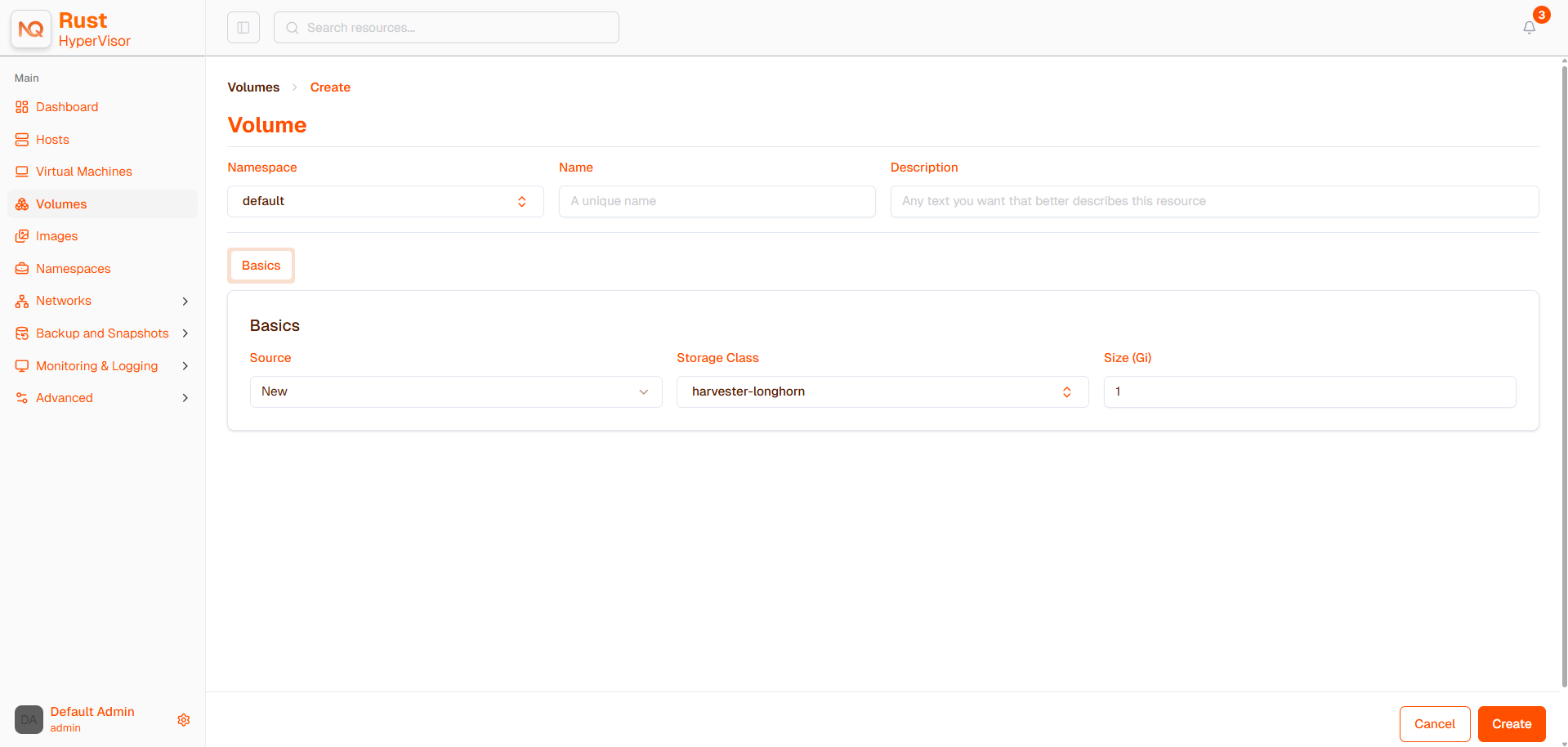
If the replica count of the selected StorageClass is
1and the volume is attached to a virtual machine, then the virtual machine is considered non-migratable.When a volume is created, it copied the related parameters from the selected
StorageClassto itself. If you change the parameters of theStorageClasslater, it does not write back to the volume.
Oversized Volumes
In Hypervisor v1.0, which uses Longhorn v1.8.1, oversized volumes (for example, 999999 Gi in size) are marked Not Ready and cannot be deleted.
To resolve this issue, perform the following steps:
Temporarily remove the PVC webhook rule.
RULE_INDEX=$(kubectl get \
  validatingwebhookconfiguration longhorn-webhook-validator -o json \
  | jq '.webhooks[0].rules | map(.resources[0] == "persistentvolumeclaims") | index(true)')

if [ -n "$RULE_INDEX" -a "$RULE_INDEX" != "null" ]; then
  kubectl patch validatingwebhookconfiguration longhorn-webhook-validator \
    --type='json' \
    -p="[{'op': 'remove', 'path': '/webhooks/0/rules/$RULE_INDEX'}]"
fi
Wait for the related PVC to be deleted.
Restore the PVC webhook rule to re-enable validation.
kubectl patch validatingwebhookconfiguration longhorn-webhook-validator \
  --type='json' \
  -p='[{"op": "add", "path": "/webhooks/0/rules/-", "value": {"apiGroups":[""],"apiVersions":["v1"],"operations":["UPDATE"],"resources":["persistentvolumeclaims"],"scope":"Namespaced"}}]'
apiVersion: v1
kind: PersistentVolumeClaim
metadata:
  annotations:
    volume.beta.kubernetes.io/storage-provisioner: driver.longhorn.io
    volume.kubernetes.io/storage-provisioner: driver.longhorn.io
  name: my-vol
  namespace: default
spec:
  accessModes:
    - ReadWriteMany
  resources:
    requests:
      storage: 10Gi
  volumeMode: Block
  volumeName: pvc-my-vol
Do not use the vmstate-persistence and longhorn-static StorageClasses when creating new volumes. vmstate-persistence is used for TPM and UEFI persistence, while longhorn-static is used for for management of existing Longhorn volumes.
Create an Image Volume
- UI
- API
Header Section
- Set the Volume
Name. - (Optional) Provide a
Descriptionfor the Volume.
Basics Tab
- Choose
VM ImageinSource. - Select an existing
Image. - Configure the
Sizeof the volume.
When creating volumes from a VM image, ensure that the volume size is greater than or equal to the image size. The volume may become corrupted if the configured volume size is less than the size of the underlying image. This is particularly important for qcow2 images because the virtual size is typically greater than the physical size.
By default, Hypervisor will set the volume size to the virtual size of the image.
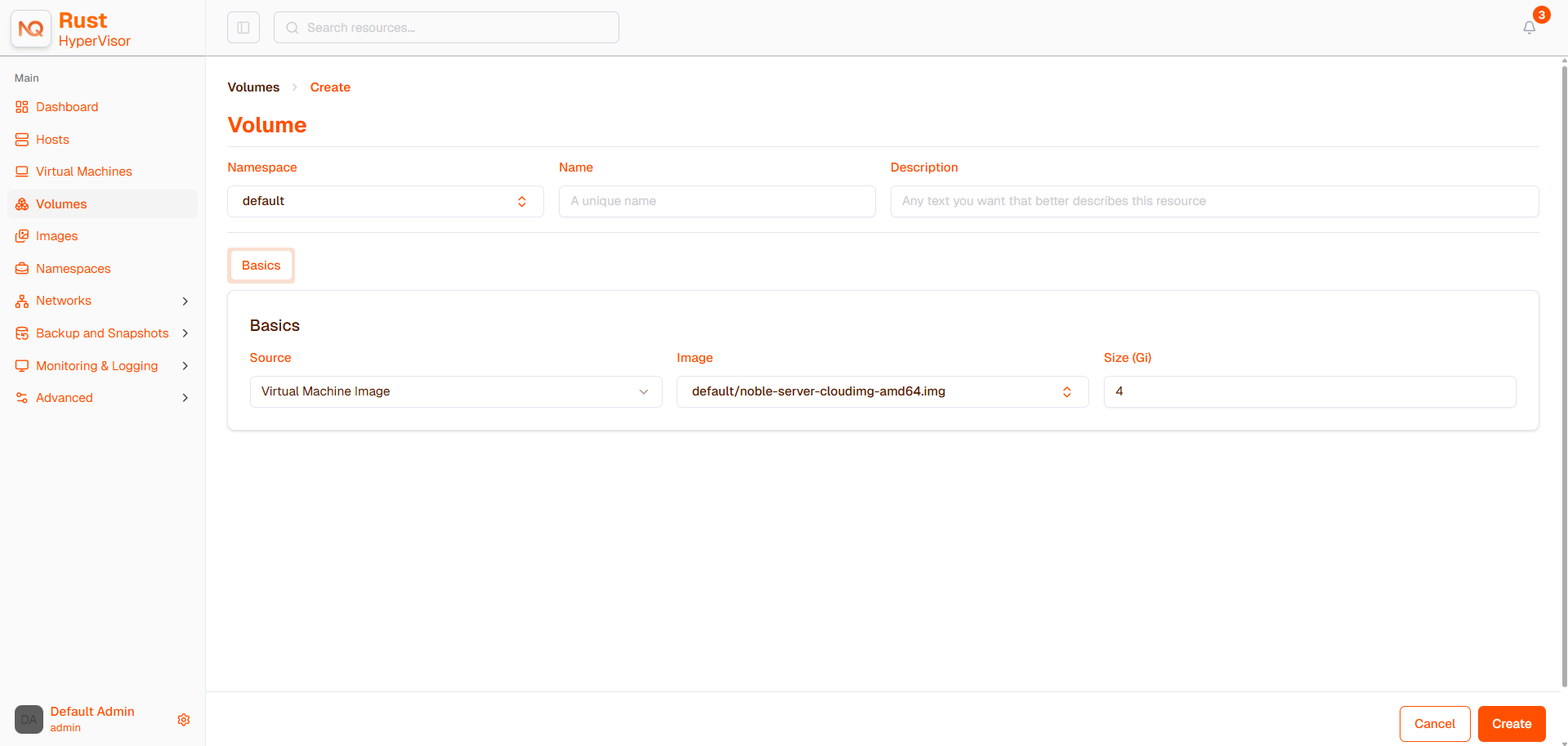
Create a volume, initialized with the contents of the image image-8rb2z from the namespace default:
apiVersion: v1
kind: PersistentVolumeClaim
metadata:
  annotations:
    harvesterhci.io/imageId: default/image-8rb2z
    volume.beta.kubernetes.io/storage-provisioner: driver.longhorn.io
    volume.kubernetes.io/storage-provisioner: driver.longhorn.io
  name: foobar
  namespace: default
spec:
  accessModes:
    - ReadWriteMany
  resources:
    requests:
      storage: 5Gi
  storageClassName: longhorn-image-8rb2z
  volumeMode: Block
  volumeName: pvc-foobar